Amwork
Designed 18 modules of a business workspace in 16 months, from the CRM to the warehouse
What I was handed
Amwork is an all-in-one workspace for small and medium businesses: a CRM, projects and tasks, a warehouse, scheduling, messaging and more. When I joined, it was a trial version made by another designer. I kept its visual style and changed it as the work went on. Its modules were at most a reference.
What I was brought in for
To design the product as the founder grew it: each new module, from the idea to the screens the developers built. For my first year I was its only designer.
Eighteen modules have to read as one product. I built them on shared parts: one header across the modules, one layout for deals and projects, one way to pick products from the warehouse.
- CRMsep 2022
- Tasks & Activitiessep 2022
- Billingoct 2022
- Projects & Tasksoct 2022
- Inventory Managementdec 2022
- Hiringjan 2023
- Mailjan 2023
- Notificationsfeb 2023
- BPM Automationfeb 2023
- Document Generationmar 2023
- Telephony & Messengermay 2023
- Plan/Fact Timejun 2023
- Appointment Schedulingjul 2023
- Lease Managementjul 2023
- Suppliers & Contractorsaug 2023
- Reportsoct 2023
- Productiondec 2023
- Web Formsdec 2023
Most of the design happened on calls. The founder described an idea, I drew a version while we talked, and the next idea went beside it. Within a day or two I worked the version out and checked it with the developers.
The product launched on ProductHunt in April 2023 and is live today. A chain of beauty salons runs its bookings on the scheduler I designed.
Staff build a set with the whole warehouse in view.
A deal can need several products at once. I found no pattern for building such a set, so I worked one out. The whole warehouse stays below, with search and filters, and a button moves each item up into the set.
Every specialist has a column of their own.
A shared calendar gets ambiguous when visits overlap. I gave each specialist a column instead, so two clients at the same hour are two clear entries side by side. A visit’s info icon opens its details, where staff change the status without leaving the schedule. Each status has its own colour: unconfirmed, confirmed, visited or cancelled.
Every module opens under the same header.
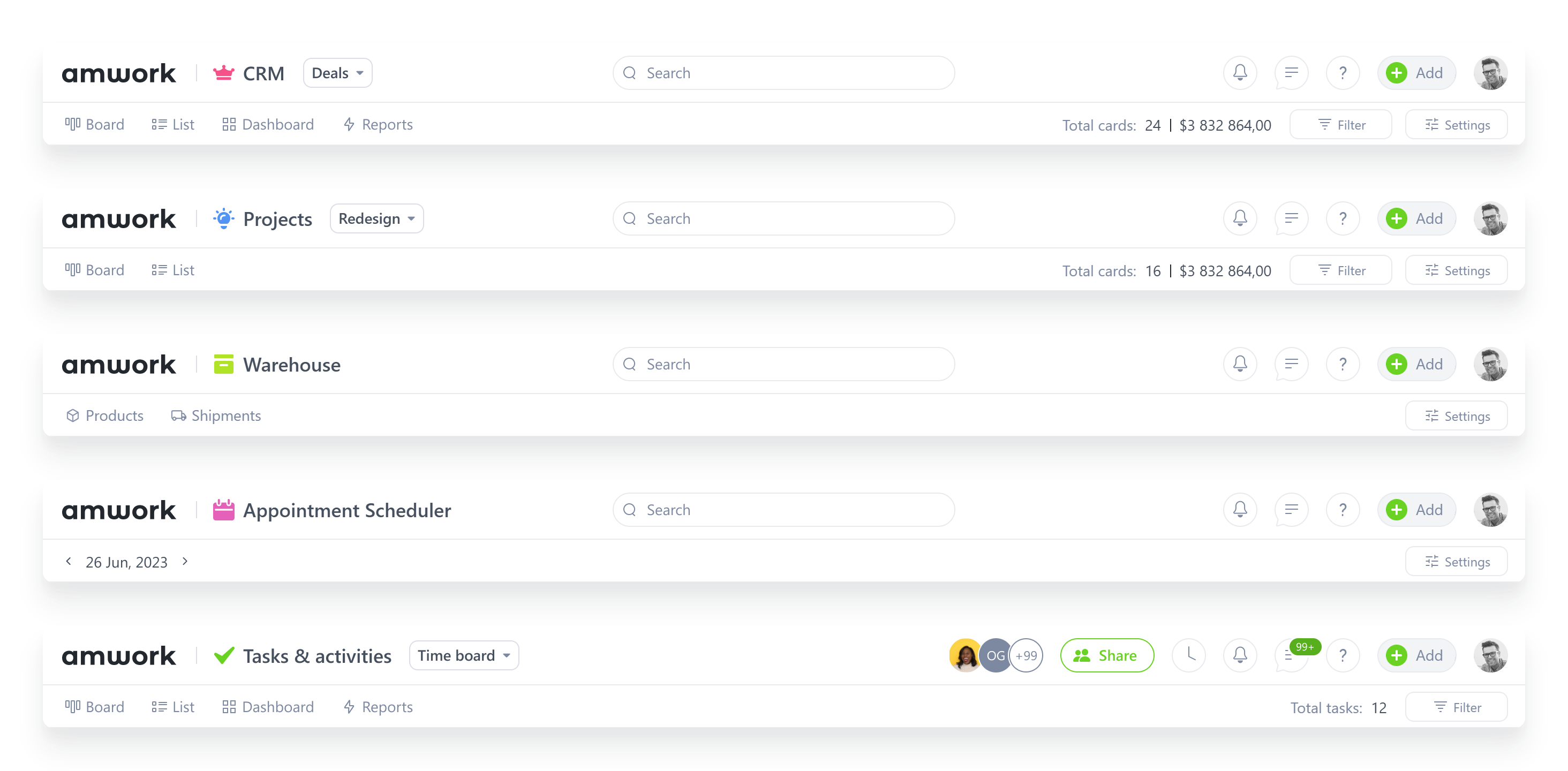
I documented the header module by module: deals, projects, the warehouse, the scheduler and tasks. The module’s name, the search, Add and the account sit in the same places. Below them each module keeps its own views, counts and filters.
open for contract and freelance work, remote. write and tell me what the problem is.